
ALLENCOMM BLOG | Insights
Beyond Post-its: Ways To Go Paperless
September 14, 2011
Not too long ago our Director of Project Managers here at Allen, Michael Hassett, mentioned to me that he’s gone almost completely paperless in his work environment. No more legal pads, just 100% digital note taking and organization with his iPad. I looked around my desk and wondered if I could ever get to the point of having a 100% paperless work environment. My first thought was ‘no’—it seems like too much work and habit-breaking to make that kind of commitment. I constantly have paper, note pads, and sticky notes scattered all over my desk. Plus, what’s the point? Is it more efficient? Or is this more a matter of going green? I feel I do my part in taking care of the environment—recycling, printing only when necessary, printing on both sides of paper when I can, flushing every other time I use the women’s restroom. Just kidding ladies—I don’t do that, he he he.
The more I thought about it the more I was convinced that maybe Mr. Hassett was on to something. Maybe switching to a paperless work environment could be a matter of increasing efficiency and decreasing stress at work all while saving the environment at the same time. Whaaat? I too have an iPad, a smart phone, and a computer at my fingertips every day. Why do I feel it’s more convenient reaching for paper when it’s just as easy—and maybe easier—reaching for one of my digital devices to take notes, organize a to-do list, and check a calendar? And I’m really already halfway. I’ve downloaded several apps on my phone and iPad—and not just Angry Birds or Fruit Ninja. I have other apps that I could use for productivity like Evernote and Note Shelf. As for my computer? Well there’s Outlook of course. And I just discovered Yahoo Widgets for desktop.
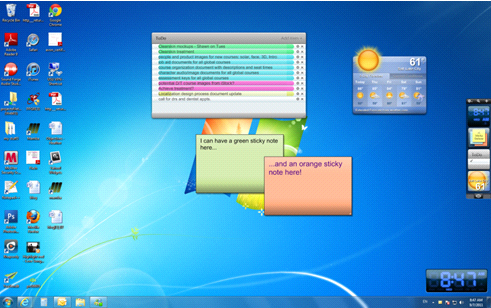
I now have a Sticky Note widget, a To Do list widget, and a Current Weather Conditions widget. I have yet to use the Sticky Notes widget because there hasn’t been a need yet. I use the To Do list widget every day. It’s actually nice to see my To Do list right on my desktop and I can move items around and order them by priority—something you can’t do on paper.
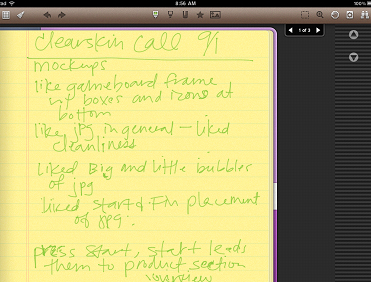
I just used the Note Shelf app on my iPad the other day for a meeting with a client. I brought a backup paper notepad and pen just in case I got frustrated writing with the iPad stylus. It worked out well. I wrote notes the whole time on my iPad and after the meeting I was even able to decipher what it wrote!
While I agree that technology isn’t always the best solution to a problem, I don’t think this should be our excuse for not moving our work habits to digital. We just need to have an open mind to try different things and see what works best for your situation.
Resources For L&D Leaders


free guide

free guide
insights | on the blog

ALLENCOMM Press Releases
AllenComm Earns Spot on Best Mobile Learning Content Providers 2026 List
eLearning Industry honors AllenComm for its custom mobile learning solutions for enterprise, built to improve performance outcomes at scale. SALT LAKE CITY, [July 29, 2026] — AllenComm has been named to eLearning Industry’s...
ALLENCOMM Press Releases
AllenComm Named a Top Employee Engagement Training Provider by eLearning Industry
AllenComm has been recognized by eLearning Industry as a 2026 top provider for employee engagement, cited for scalable, personalized L&D that drives measurable results. SALT LAKE CITY, [June 24, 2026]...
ALLENCOMM Press Releases