Frequently Asked Questions

Features & Capabilities

What visual training technologies does AllenComm support?

AllenComm supports a range of visual training technologies, including 3D modeling for hands-on exploration, 360° video for immersive scenario-based learning, and both augmented reality (AR) and virtual reality (VR) for interactive and simulation-based training. These technologies are integrated into solutions like the Siteline platform, which combines AR, 3D models, and a content library for cross-referencing and on-the-job support. Note: AR/VR implementations can require substantial investment and may not be suitable for all budgets; cost-effective alternatives are available as technology advances. Source

How does AllenComm integrate visual technologies into custom training solutions?

AllenComm integrates visual technologies by combining 3D models, 360° video, and AR/VR into platforms like Siteline. For example, Siteline was used for a manufacturing client to provide AR-based access to machinery documentation and interactive 3D models, improving operational efficiency and recall. These solutions are designed to be adaptable across industries. Note: Implementation complexity and cost may vary depending on the technology stack and industry requirements. Source

What are the key features of the Siteline platform?

Siteline is AllenComm's interactive mobile workflow platform that integrates AR capabilities, 3D models, and a powerful content library. It enables workers to access relevant information for machinery operation, supports cross-referencing, and is designed for use on the manufacturing floor and other industries. Note: Siteline's advanced features may require device compatibility and technical setup; detailed limitations not publicly documented—ask sales for specifics. Source

Does AllenComm support integration with other business systems?

Yes, AllenComm supports integration with a variety of business systems, including Learning Management Systems (LMS), Learning Content Management Systems (LCMS), Learning Experience Platforms (LXP), Human Resources Information Systems (HRIS), CRM, ERP, and specialty applications for skills management, gamification, and adaptive learning. AI and data integration are also supported for reporting and insights. Note: Integration capabilities may depend on the specific platforms and technical requirements of your organization. Source

Does AllenComm offer an API for data tracking and integration?

Yes, AllenComm supports xAPI (Tin Can) for learning data tracking and integrations, and also offers a proprietary API for use cases such as integrating with other systems, retrieving and populating course data, and supporting mobile learning experiences. Note: API capabilities may require technical resources for implementation; detailed API documentation is available upon request. Source

Use Cases & Benefits

What business problems does AllenComm solve with visual training technology?

AllenComm addresses fragmented learning ecosystems, uncertainty in technology selection, sales enablement gaps, cost inefficiencies, and onboarding challenges. Visual training technologies like 3D modeling, 360° video, and AR/VR are used to create immersive, interactive, and effective learning experiences that improve engagement, retention, and operational performance. Note: Effectiveness depends on alignment with organizational goals and readiness for technology adoption. Source

Who can benefit from AllenComm's visual training solutions?

Organizations in industries such as manufacturing, healthcare, finance, and retail can benefit from AllenComm's visual training solutions. Use cases include machine operator training, clinical education, onboarding, compliance, and sales enablement. The Siteline platform and custom solutions are adaptable to various industry needs. Note: Suitability depends on industry-specific requirements and technology infrastructure. Source

What measurable business impact can be expected from AllenComm's solutions?

Customers can expect improved employee performance, measurable ROI, cost savings, enhanced customer experience, future readiness, increased revenue, and reduced onboarding time. For example, effective onboarding programs can improve new-hire productivity by 50% and increase retention rates by nearly 60% over three years. Note: Actual results depend on solution alignment and implementation quality. Source

Technical Requirements & Documentation

What technical documentation does AllenComm provide for its solutions?

AllenComm offers system administrator documentation (integrated into Zendesk for 24/7 access), maintainable templates and documentation for Storyline courses, and resources to support independent course updates and scaling. Note: Availability and scope of documentation may vary by solution; contact AllenComm for the latest updates. Source

Pricing & Plans

What is AllenComm's pricing model for custom eLearning development?

AllenComm uses two main pricing models: per-finished-hour pricing (for projects where content duration is key) and project-based pricing (for well-defined scopes). Pricing is determined by factors such as the number of content screens, interactivity types, rounds of revision, and media assets. A detailed scope of work is emphasized to avoid cost overruns. Note: Pricing details are project-specific; contact AllenComm for a tailored quote. Source

Implementation & Support

How long does it take to implement AllenComm's solutions and how easy is it to start?

Implementation time depends on project scope and existing systems. Most clients see immediate improvements in learner engagement and reduced administrative complexity after integration. AllenComm provides a streamlined onboarding process, discovery conversations, and downloadable guides to support a smooth start. Note: Timelines vary by project; tight deadlines are supported by AllenComm's large in-house L&D team. Source

Customer Experience & Proof

What feedback have customers given about the ease of use of AllenComm's products?

Customers have highlighted AllenComm's intuitive navigation, accessibility across devices, and custom interfaces. Microlearning solutions are praised for smart content architecture and technical portability. For example, Valerie Iorg from American Express described their online training product as 'extremely comprehensive yet very easy to use.' Note: User experience may vary based on solution customization and deployment environment. Source

Awards & Recognition

What industry awards has AllenComm received for its training solutions?

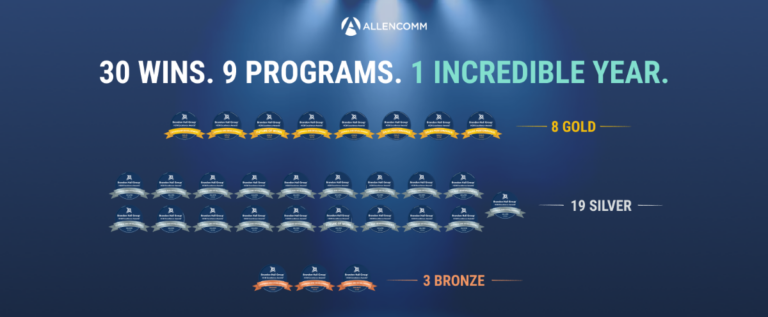
AllenComm has been recognized by eLearning Industry as a top provider for mobile learning content (2026), employee engagement training (2026), and content that proves training ROI (2026). The company has also won Horizon Interactive Awards, with the 2019 competition receiving nearly 800 entries and the 2022 competition receiving 650 entries from 15 countries. Note: Awards reflect past performance; relevance to your project should be discussed with AllenComm. Source

Opens in a new tab
Sign in / Register
CONTACT US:(801) 537-7800
Men at Work Recording a Video of Mechanics

ALLENCOMM BLOG | Insights

Why Visual Training Technology Should be Part of Your Training Strategy

January 10, 2019

Seeing is believing. A picture is worth a thousand words. There are dozens of clichés out there that drive home how important visuals are for learning and processing information. It’s no surprise, considering that human beings are visual creatures. As we move into 2019, we wanted to take a look at how training technology is enabling us to incorporate visual learning into custom corporate training in a way that’s more engaging, interactive, and immersive than ever before!

What Visual Training Technology is Out There?

3D modeling

It’s commonly said that “learning by doing” is one of the most effective ways to learn. This is one of the reasons why among all the exciting, buzz-worthy, new technological advances out there, we think that the integration of 3D models in training deserves a little more hype. After all, with the right implementation, a 3D model can provide learners with hands-on exploration and active learning practice anytime, anywhere, and without the need to splurge on product mockups or physical simulations.

Consider, for example, a machine operator who is able to select different areas of an equipment model to access all the relevant parts and procedure documentation. Being able to—quite literally—see what information is relevant to each section promotes recall and allows for more efficient operation in the future. What about a cardiovascular clinician exploring the inside of a heart through the use of a 3D model? The ability to zoom in on particular areas of interest would be an opportunity you couldn’t easily replicate in the physical world. With a little abstraction, the benefits of 3D models can extend to almost any industry out there, providing immersive active learning in a budget-friendly way.

360° video

Another effective new training method to promote immersion is through 360° video, a technique that has taken the world by a storm over the past few years. These videos, which record footage in all directions simultaneously, allow the viewer to change their viewing direction as if they were actually situated in the middle of the scene. The effect is similar to a virtual reality experience, except that no special equipment is needed to dive in.

One major benefit of this video style is that it gives learners an opportunity to feel a presence within the scenario. It adds depth to observational learning, allowing users to learn where to direct their attention and what to expect from the flow of a situation. It can even be used to provide in-person training without the instructor needing to be physically present. All of these applications add immersive depth and promote learner engagement while remaining highly cost-effective.

AR/VR

While 3D modeling promotes interactivity and 360° video immerses the learner in the scenario, to realize the benefits of both, we need to take a step further. Augmented reality and virtual reality technology are often grouped together, but there are distinct differences between them that provide for unique training experiences. Augmented reality overlays information and content over what the user is seeing around them in real time. This makes it best for just-in-time learning and for accessing relevant information on the job.

Virtual reality, on the other hand, immerses the user entirely in a virtual world, allowing them to move, explore, and interact with key features. This makes it one of the most innovative and engaging methods for scenario and simulation training. For instance, VR can be used to replicate emergency preparedness scenarios to test employee skills under simulated pressure without having to set aside time and hire actors for a convincing in-person training session.

While more cost-effective solutions are becoming available as technology improves, it’s worthwhile to note that AR/VR can be a substantial investment to make. However, we believe that the immersion and engagement it provides learners can be well worth it when properly implemented.

How AllenComm Brings it All Together

It’s always been important to us to take an innovative approach to training, making the most out of new technology as we develop the best strategies to meet our clients’ needs. Siteline, our interactive mobile workflow platform, is our response to the world of visual training technology. This platform takes traditional content learning to another level by weaving in all three of the different technologies discussed above.

We pioneered Siteline for one of our manufacturing clients, using AR capabilities to give workers access to the information they needed to operate their machinery. We paired a powerful content library with 3D models, available through either medium and organized in a way that promoted easy cross-referencing. Siteline was the perfect match for the manufacturing floor, but we believe it has the potential to transform training in a multitude of other industries as well.

Curious about how Siteline works? Interested in how this technology could fit within your industry? Don’t be afraid to reach out!

Resources For L&D Leaders

free guide

a buyers guide to l&D services
In today’s world, it can be hard to balance learner needs and stakeholder expectations. We want to see you thrive and get the most out of your investments. Snag our free buyer’s guide with the top 5 questions you should ask when looking at potential L&D partners.
get the free guide

free guide

what to look for in onboarding
Effective onboarding begins even before someone’s first day, and it continues months after as the new hire finds their purpose and value within the team. Explore insights into what makes a successful employee experience, and dive deeper into creating meaningful moments that build confidence, behaviors, and affiliation for better outcomes.
get the free guide

This site uses cookies to enhance your browsing experience. These cookies help us understand how you interact with our website, remember your preferences, and improve our services. They also provide insights for analytics and performance tracking across this site and other media. To learn more about the cookies we use, please review our Privacy Policy.

Accept